
For years, virtual PDF printers have quietly served as an important integration technology inside the enterprise. Every day, employees click Print without necessarily intending to produce anything on paper. Instead, the resulting PDF may be archived, uploaded to a document management system, emailed, routed into a business application or used to initiate another workflow.
For many organizations, the virtual PDF printer has become a bridge between applications, particularly older applications with limited integration options, and modern digital processes. Now Microsoft is changing the foundations on which many of these workflows depend.
The move away from traditional printer drivers
Traditional virtual PDF printers usually rely on Windows printer drivers. This architecture has served businesses well for decades, but it brings many of the same challenges associated with physical printer drivers:
- Security exposure
- Complex deployment
- Ongoing driver maintenance
- Dependence on operating-system and processor architecture
- Compatibility problems following Windows updates
Microsoft is progressively ending the servicing and preferential distribution of traditional third-party printer drivers. Windows now favors its inbox IPP class driver and the standards-based Windows Ready Print platform. From July 2027, Microsoft generally plans to accept only security-related updates for existing third-party printer drivers.
Existing drivers will not suddenly stop working on a particular date, but the direction is clear: Microsoft wants the future of Windows printing to be based on IPP and driverless printing rather than third-party printer code. This creates an important question for software vendors and enterprises:
How do we modernize the business workflows that currently depend on a traditional virtual printer?
This isn’t really about printing
Replacing the print queue is only part of the answer. In a typical Windows Ready Print workflow, Windows renders the application’s print job into a format supported by the IPP endpoint. If that endpoint advertises support for PDF, Windows will normally create the PDF before sending it.
Where the originating application already has a PDF and supports PDL pass-through, it may be able to submit that PDF directly. In either case, the IPP virtual printer receives a client-supplied PDF; it does not necessarily create the original PDF itself. That distinction is important. An IPP endpoint does not automatically improve the quality of the PDF created by the client’s print system. Its real opportunity lies in what happens after the PDF has been received.
Instead of simply forwarding the document, imagine a workflow that automatically:
- Validates the PDF
- Identifies and repairs common document problems
- Converts it to PDF/A for long-term preservation
- Adds metadata, watermarks or security controls
- Merges or splits documents
- Extracts text and images
- Creates thumbnails or page previews
- Classifies the document
- Routes it to the appropriate business system
- Prepares it for OCR or AI analysis
- Archives both the document and the information extracted from it
The familiar user experience can remain: select a printer and click Print. Behind that simple action, however, a much more capable business process can begin.
From virtual printer to document workflow gateway
A network-advertised IPP virtual printer is first and foremost a document-capture endpoint. It gives applications and users a standards-based way to submit print jobs without installing a traditional third-party driver.
If the requirement is only to receive and store the PDF unchanged, a basic IPP endpoint may be sufficient. There is little benefit in adding a sophisticated document-processing engine if no document processing is required.
The value of technology such as the Mako Core SDK becomes clear when the received PDF must be understood or changed before reaching its destination. Mako enables developers to inspect and repair PDFs, normalize files, convert to standards such as PDF/A or PDF/X, insert metadata, apply watermarks, merge or split documents, redact content, extract text and images, render pages and integrate the document with wider enterprise workflows.
The IPP endpoint provides the capture channel. Mako provides the document-engineering capabilities behind it. Together, they can turn a simple print action into a controlled integration point between an originating application and the systems that need to use its documents.
It is equally important to recognize what downstream processing cannot do. If information has already been removed or altered by the client’s print conversion, Mako cannot recreate what is no longer present. Where the quality and fidelity of the original PDF are critical, direct application integration or a virtual-printer architecture in which Mako performs the original conversion may be more appropriate.
AI changes the conversation
Once a document has been received, validated and prepared, it can become the trigger for an AI-enabled business process. Mako can extract text, images, metadata and rendered page content from the PDF. That information can then be submitted to enterprise AI services such as Microsoft Copilot, Azure OpenAI, ChatGPT Enterprise or a privately deployed language or vision model. Depending on the wider solution, organizations could use AI to:
- Classify documents
- Generate summaries
- Identify sensitive information
- Extract business entities and values
- Detect missing or anomalous information
- Generate workflow instructions
- Enrich document metadata
- Support review and approval processes
A purchase order produced by a twenty-year-old ERP application could therefore become the starting point for structured business intelligence without requiring the ERP application itself to be modified.
The virtual printer does not provide the intelligence on its own. It creates a convenient capture channel through which document engineering, workflow automation and AI services can be brought together.
Network IPP endpoint or Windows virtual printer?
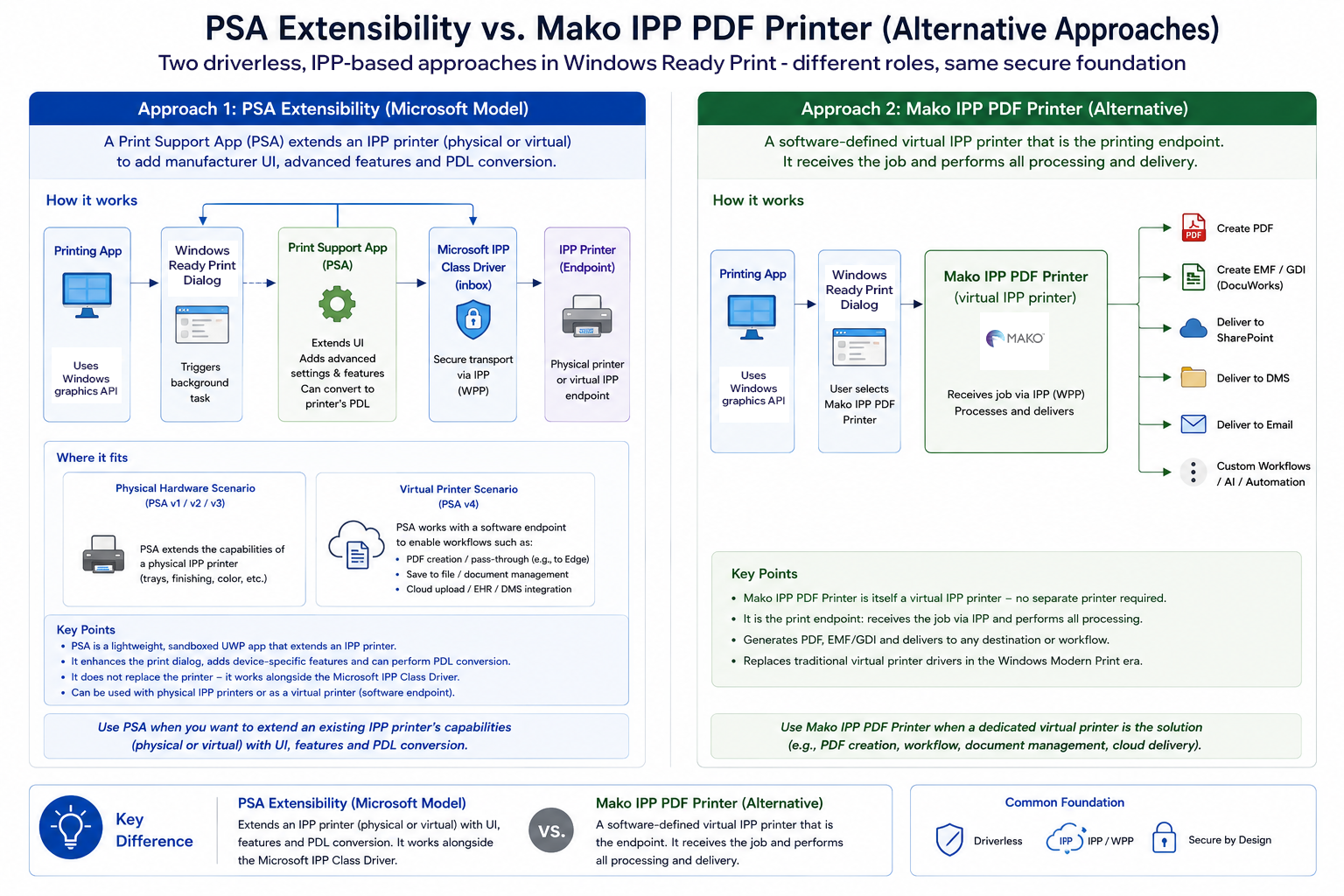
There is more than one way to build a virtual printer for the Windows Ready Print era. Microsoft’s Print Support App architecture was originally introduced to extend physical IPP printers with manufacturer-specific interfaces, settings and device capabilities. Microsoft has since expanded the architecture to support Print Support Virtual Printers – software endpoints that can install their own virtual print queues without relying on a traditional third-party printer driver.
This creates two possible approaches. A Windows Print Support Virtual Printer can provide a modern replacement for a locally installed Windows virtual printer. Depending on its configuration, it can receive an OXPS or PostScript print stream and use a technology such as Mako to create the final PDF. This offers greater control over PDF creation, but it is primarily a Windows-specific solution.
A network-advertized IPP endpoint takes a different approach. It appears as a network printer and receives a document format supported by both the client and the endpoint -PDF in the case of Helix’s current reference implementation. Because it is based on network standards rather than a locally installed Windows driver, it has the potential to support a broader range of devices and operating systems.
The two approaches are complementary. The appropriate choice depends on whether the requirement is:
- A Windows-specific replacement for an existing virtual PDF printer
- A shared network document-capture service
- Control over the original creation of the PDF
- Processing and enriching a PDF that the client has already created
- Or a combination of these requirements
Understanding that distinction at the start of a project is essential.
Built for a multi-platform world
IPP has become a widely adopted printing standard across Windows, macOS, Linux, ChromeOS, iOS and Android.
A network IPP endpoint therefore has the potential to provide a common document-capture channel across multiple operating systems and devices. However, IPP support alone does not guarantee identical behavior everywhere.
Compatibility depends on factors including:
- Network discovery
- Authentication and security
- The document formats accepted by the endpoint
- The formats each client is capable of submitting
- The print capabilities advertized by the endpoint
- The behavior of individual applications
A cross-platform implementation must therefore be tested against the operating systems, devices and applications it is expected to support. Nevertheless, standards-based IPP provides a much stronger foundation for shared document capture than maintaining separate proprietary printer drivers for every platform.
The bigger opportunity
It is easy to view Windows Ready Print as simply another change to the Windows printing architecture. Its implications are potentially much broader. The move towards standards-based, driverless printing creates an opportunity to reconsider document workflows that may have remained largely unchanged for decades. For organizations that only need to capture and store a PDF, a simple IPP endpoint may be all that is required. For organizations that need to validate, transform, enrich, understand or route the document, the opportunity is considerably greater.
Rather than asking: How do we replace our existing virtual printer? Perhaps the more useful question is: What should happen to the document after the user clicks Print?
With Mako Core 9, Helix is introducing an IPP-ready virtual PDF printer reference implementation for OEMs and ISVs. It provides a standards-based channel for receiving client-generated PDFs and a foundation on which developers can use Mako to validate, transform, enrich and route documents into enterprise workflows, archives and AI-enabled processes.
The virtual printer is the entry point. The lasting value comes from the document engineering and business process that follow.
For more information visit: hybridhelix.com/mako
About the author

Harrison Fox is a software developer in the Platform Tools team at Helix. He focuses on developing tools that support the Mako Core OEM partners and internal development teams.
Be the first to receive our software release updates, blog posts, company and product news. Why not subscribe to our newsletter? Subscribe here